GGUF Editor D++




🖥️ Desktop Application for high-performance GGUF model editing, tensor visualization, quantization, and multi-model merging. Built with Delphi for speed, reliability, and low memory footprint.
📖 Overview
GGUF Editor D++ is a feature-rich, native Windows application designed for AI researchers, quantization engineers, and model developers. It provides a seamless workflow for inspecting, comparing, converting, and editing GGUF and Safetensors models. Leveraging memory-mapped I/O, parallel processing, and optimized C/DLL delegates, it handles large-scale models (70B+) with minimal RAM usage and maximum responsiveness.
✨ Key Features
| Category | Capabilities |
|---|---|
| 🔍 Tensor Visualization | Real-time charts, histograms, and difference statistics (RMS, MAE, Mean). Compare Model A vs B with outlier/block highlighting. |
| 🔄 Quantization Engine | Full support for GGML quantization types. Custom presets, RMSE optimization, and parallel chunk-based conversion. |
| 📊 Multi-Model Comparison | Load GGUF (Model A/B) + Safetensors side-by-side. Visualize shape/dtype mismatches and absent tensors. |
| 🏷️ Smart Mapping & Filtering | Apply regex-style tensor naming patterns, ignore prefixes, and filter by layer/type dynamically. |
| ✏️ Metadata & KV Editor | Full control over GGUF key-value pairs. Edit strings, arrays, floats, and convert types on-the-fly. |
| 📦 Split & Merge | Shard large models or merge multiple sources into a single aligned GGUF file. Supports Safetensors sharding. |
| ⚡ Performance Optimized | MMAP file reading, System.Threading parallel quantization, DLL delegation for heavy math, and zero-copy buffer handling. |
| 🌍 Multi-Language UI | 10+ languages supported with dynamic runtime translation. |
| 💾 Persistent Configuration | Auto-saves window positions, quant presets, filters, and UI preferences. |
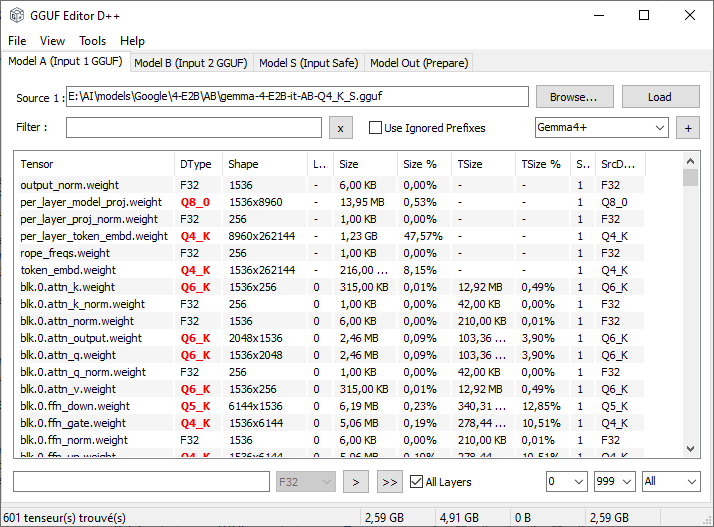
Screenshot Main App.
🛠️ Installation & Requirements
System Requirements
- OS: Windows 10 / 11 (64-bit)
- CPU: x86-64 (AVX2/AVX-512 recommended for optimal quantization speed)
- RAM: 8 GB+ (scales with model size; MMAP minimizes peak usage)
Dependencies
GGUF_Editor.exe(Main executable)ggml-base.dll(Required for optimized quantization/dequantization backends)- Place it in the same directory as the executable.
- Provides C-level delegates for
dequantize_row_*andquantize_*routines.
- Standard VCL/TeeChart runtime (bundled with release)
⚠️ Note: This is a desktop application, not a machine learning model. It runs locally on your machine and does not upload data.
📊 Supported Formats & Quantizations
Input Formats
- ✅ GGUF (v3+ aligned)
- ✅ PyTorch Safetensors (single & sharded:
model-00001-of-00002.safetensors)
Quantization Support
| Standard | K-Quant | IQ Series | Ternary | FP4 / MoE |
|---|---|---|---|---|
Q4_0, Q4_1, Q5_0, Q5_1, Q8_0, Q8_1 |
Q2_K to Q8_K |
IQ2_XXS, IQ2_XS, IQ2_S, IQ3_XXS, IQ3_S, IQ1_S, IQ1_M, IQ4_NL, IQ4_XS |
TQ1_0, TQ2_0 |
MXFP4, NVFP4 |
F16, BF16, F32, F64, I8/I16/I32/I64 |
🚀 Quick Start
- Download the latest release from the repository.
- Extract the folder and ensure
ggml-base.dllis present. - Launch
GGUF_Editor.exe. - Load Models:
- Drag & drop GGUF/Safetensors files into the
Model A,Model B, orSafetensorstabs. - Or use
File > Openmenus.
- Drag & drop GGUF/Safetensors files into the
- Compare & Edit:
- Select tensors in the list view.
- Apply quantization via the
DTypedropdown. - Visualize differences in the
View Tensorstab. - Edit metadata in
Tools > Edit KV Pairs.
- Save/Export: Configure split size, output path, and click
Save.
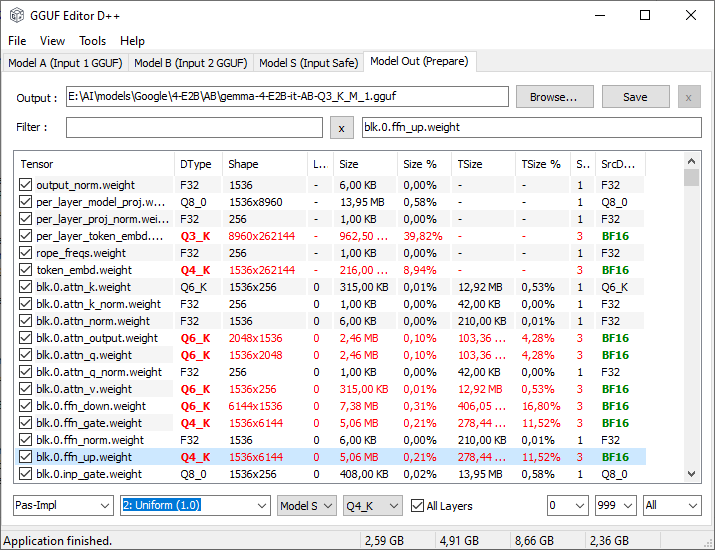
Workflow diagram.
🤝 Credits & Support
- Developer:
abbndz - Contact:
abbndz@gmail.com - Support / Donate: Ko-fi
- Built With: Delphi, VCL, TeeChart, GGML C Library, Memory-Mapped I/O
📜 License
This project is released under the MIT License. You are free to use, modify, and distribute it for personal or commercial purposes. See LICENSE for full terms.
🐛 Known Issues & Notes
- Safetensors sharded models are automatically detected and loaded sequentially.
- Large tensor charts (>64k points) use LOD sampling by default for UI responsiveness. Enable
Full Histogramin settings for exact distribution.
⭐ If you find this tool useful, please star this repository and consider supporting development on Ko-fi!